Breaking

Showing posts with label Security. Show all posts

Thursday, February 14, 2019

February 14, 2019

Google Releases Password Checkup & Cross Account Protection

Google has released two updates to mark Safer Internet Day which would protect user data, including usernames and passwords. One of them is a neat extension for the desktop version of Chrome, while the other is called Cross Account Protection.
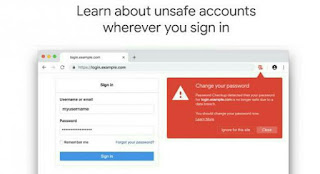
Google has gathered a massive dump of 4 billion compromised credentials to keep your username and account safe from hackers and attacks. When you install the extension called Password Checkup, it matches the data you’ve shared with Google with the one typed in and tells you if any of the entries was hacked. If it suspects any of your entries to be hacked, it will trigger an automatic warning and suggest changing your password.

There are needs to protect your usernames and passwords especially the ones getting into your Google Account, gj if you store card data, accounts for online banking and other sensitive information. Some protections haven’t extended to the app you use for Google Sign In, so Cross Account Protection comes in handy.

 According to Google "We built Password Checkup so that no one, including Google, can learn your account details. To do this, we developed privacy-protecting techniques with the help of cryptography researchers at both Google and Stanford University."

 Password Checkup is a Chrome extension that will detect whether the username and password you’re using to login to an online account or service have been stolen. If either has, an alert will pop up in your browser, advising you of the breach and suggesting you change your password.

 Although Google can implement protections if you’re using its services and it thinks you’ve been hacked, before the introduction of Cross Account Protection, Google was unable to implement the same security processes. However, now it will share any breach data with the third party, so they can take action, such as forcing you to re-login.

 But instead of leaking all kinds of sensitive information, the breached host will only know the fact of security event happening and when that occurred. The feature was developed with Adobe, Internet Engineering Task Force, and Open ID Foundation.

Wednesday, February 13, 2019

February 13, 2019

How To Improve Email Security

Email security, improve email security, how to improve email security
Image from Pixabay
Despite the emergence of countless digital communication channels, especially social media networks, the significance of email has not died down. That, and the fact that usage of email keeps growing on a daily basis, even going so far as to be a necessary requirement when creating most online accounts, goes to show just how important email is. However, just as its significance and usage increases, so too do the threats that plaque it, especially with regard to cybersecurity. Imagine what a devastating blow it would be if all the information contained in your email was exposed, including sensitive information such as the login credentials to various websites and your financial information. Since email security is paramount, we aim to explore various ways to improve it.

  Employ the use of SSL/TLS
One of the most significant security threats to email is man-in-the-middle attacks, where hackers intercept your emails. The risk increases exponentially when the hackers decide to hack the individual instead of the system and send you emails. The best way to prevent man-in-the-middle attacks of this nature is to make use of SSS/TLS, both of which are encryption protocols that protect the information shared between the computer and a server as well as between two or more servers. SSL/TLS encryption prevents the emails from being intercepted while in transit between the various servers and systems.

  Encrypt your email
Although SSL/TLS encryption protects your emails from interception, it does not protect the email messages directly. Therefore, it is important to have that extra layer of security by encrypting your email. This guarantees that even if the email is intercepted, it still remains secure without exposing the information contained within. While there are plenty of plugins and email encryption software out there, we recommend using OpenPGP, otherwise known as GNU Privacy Guard (GPG). The software encrypts your email in a way that guarantees that only the sender and the recipient can access it. Both the sender and the recipient have access to a keypair – both public and private. The public key is interchangeable and responsible for the encryption, while the private key is always fixed and is responsible for decrypting the emails. 

  Exercise caution when opening emails
Hackers have a tendency of using emails to send malware through emails. Often, they do this by sending email attachments and links with messages that appeal to your interests. For instance, you could receive an email about a free holiday urging you to click on a link to find out more. Therefore, you should treat all suspicious emails with caution, particularly when dealing with spam. As long as you don’t know the sender of the email, you should be cautious about opening it. Nevertheless, hackers aren’t the only threat you should be concerned about when using your email. Companies have a tendency to send tracking links to monitor the click and open rate of their emails. Compared to the malware issue, this might not sound like much of a problem. However, these tracking links compromise your privacy and expose your habits, which is just as much of a problem as hacking.

  Make use of multiple email accounts
As mentioned before, there’s an increase in the significance and usage of email. As such, it is not uncommon to find people using a single email account for various purposes. Unfortunately, that is much like putting all your eggs in one basket and increases the risk of being compromised. Therefore, we advise making use of multiple email accounts for different purposes. For instance, you can split your accounts to handle banking/finances, work/business, and social media. Doing this reduces the risk of exposure and increases the chances of you detecting when something is out of order. For instance, when you receive non-financial information to your financial email account, you can tell that it is suspicious and take appropriate measures. 

  The Takeaway
While the methods listed in this article may not be the only way to improve email security, they are some of the most important, especially when it comes to encryption. Nevertheless, you should make sure to read more about improving email security and employ as many methods as possible to guarantee better protection of your email accounts.

Sunday, June 17, 2018

June 17, 2018

Apple set to close iPhone security loophole used by hackers and police

Apple says it will change the default settings of its iPhone to stop hackers and law enforcement agencies to unlock devices without legal approval.
Apple company, iPhone, iPhone security, Apple set to close iPhone security loophole used by hackers and police

The Apple company has announced that a forthcoming software update will fix a vulnerability that allowed data to be transferred via the iPhone’s Lightning port without legal authorisation.

The move will also make it more difficult for police to unlock handsets without authorisation.
However, Apple denied the changes were designed to thwart US law enforcement. The company has been a prominent opponent of US legislation to force technology companies to maintain access to users' communications.

In the update, the iPhone’s Lightning port will disable data transfer functionality. Once the device locks, nothing would be transferred from it unless the user’s password is entered first. Before, a loophole meant it was theoretically possible to access a handset’s data at any time using specialist ‘cracking’ software or hardware.
Police forces made use of the ‘flaw’ to glean evidence and background information from phones for use in criminal investigations, but weren’t required to attain authorisation.

“We’re constantly strengthening the security protections in every Apple product to help customers defend against hackers, identity thieves and intrusions into their personal data. We have the greatest respect for law enforcement, and we don’t design our security improvements to frustrate their efforts to do their jobs,” Said Apple.

The changes to the default settings of the iPhone are intended to stop unauthorised access to the phones via the USB port without full legal authorisation.

Sunday, May 27, 2018

May 27, 2018

5 Ways Deception Tech Is Interrupting Cyber Security


Enterprises and their Security Operations Centers (SOCs) are under siege. Security events are being triggered from all corners of the security stack – from the firewall, endpoints, and servers, from intrusion detection systems and other security solutions. What’s more is that security teams do not have enough people or hours in a day to analyze the alerts that are coming in, and most ‘security events’ don’t even imply an attack in progress. They often are simply sharing information (failed connections, for example) or are what we call ‘false positives’ (when a solution thinks it has found a specific vulnerability, but in fact, it hasn’t.) 

“Europe's leading digital technology conference”

It's happening, Join 15k digital minds to shape what's next for your business
  This is important because today, attackers use stealthy tactics that leverage these security challenges – after infecting an asset inside an organization, they keep a low profile, moving laterally in the hunt for valuable, sensitive data. The longer they stay in the network, the harder it becomes to detect their trail. The average ‘dwell time’ – how long an attacker or malicious insider is inside an organization’s network – is measured in months, with some estimates in the 200+ day range. That’s why it’s critical for organizations – both large and small – to focus their cybersecurity strategy on earlier detection and faster response. One of the technologies trend that is promising to do this, is deception.

What is deception technology?

Sun Tzu said it best in his book on The Art of War: “All warfare is based on deception.” ‘Deception’ is a classic tactic used in warfare, both for protection and as a mechanism to attack enemies. One of the best-known deception operations conducted during World War II was when the British deceived the Germans in Operation Mincemeat, which preceded the invasion of Sicily. This was a classic operation of planting strategic misinformation in order to deceive the enemy and distract them from the real place where the attack actually took place. The idea behind a cyber deception strategy is similar. Organizations often know to varying degrees what the attackers are looking for, what they expect to find, and how they might attack and use the information they find – so why not use this against them? The ultimate goal of deception is to lure attackers to ‘decoy’ assets that look and feel real but aren’t. This can be done through different methods including traps in the network, on the endpoints and servers, data traps, and more. By engaging with the decoy or deception environment, attackers or malicious insiders essentially reveal themselves to the organization – but they don’t know it.

5 ways deception is changing the cybersecurity landscape

Often people hear ‘deception’ and they immediately think of ‘honeypots’ – which is basically a static decoy that imitates a simple computer system and does nothing unless an attacker stumbles across it. However, deception technology has greatly improved beyond the honeypot concept today. How? By being active – both in luring and baiting attackers to a deception environment, as well as in the decoys. Here are five ways deception technology is changing the cybersecurity landscape:

1. Maximum accuracy with minimal human investment

When a deception solution triggers an alert, organizations know it is an accurate incident no matter what – goodbye false positives! Any access to the deception layer is by definition malicious and the security team has to investigate it immediately. With cybersecurity teams struggling to focus on real threats due to all the “noise” that is generated from the multiple layers of security tools and the lack of personnel to physically triage and investigate each alert.

2. Get personal with your business

Deception has taken the honeypot concept to another level. It structurally learns and adapts to your organization’s network and cloud environments. Decoys change to match the real environment as it changes. Additionally, solutions that use ‘breadcrumbs’ can strategically lure attackers and malicious insiders to the decoys. This ‘personalization’ is critical to a modern deception defense – to ensure that the deception components always look and feel real to bad guys.

3. Ensure a post-breach defense for any type of attack

Cyber attacks come in many forms. Deception provides a post-breach defense that is agnostic to the type of attack. Whether the attack is by spear phishing, drive-by download, or comes through from a connected device, deception lets you know there is someone inside your network looking to steal data.

4. Triggers threat hunting operations

Threat hunting exists in only the largest, most mature security organizations. But even smaller companies can make this highly advantageous strategy work with deception. Deception provides the first true signal of an infected asset that a threat hunter can use to quickly begin the investigation process.

5. Empowers organizations towards strategy and active defense

Traditional security attempts to block and prevent threats. It’s a constant game of cat-and-mouse. Deception changes this game by giving defenders the ability to learn about attackers in a similar manner that attackers try to learn about their targets. Once they know an attacker is in the network, they can observe their behaviors and patterns. This intel helps security teams better understand what attackers are after and the best way to respond.

Finally

While prevention defenses are certainly still needed, it’s clear that advanced threats still have too much success. Early detection is now more critical than ever. Every business needs to be strategizing about how they plan to fill the detection to infection gap. There are several vendors offering deception, including Fidelis Cybersecurity, Trapx, Attivo and Illusive Networks. Deception is one technology that can significantly reduce dwell time. On top of this it is easy to install, does not require a lot of resources to manage, and it increases the effectiveness and the efficiency of security teams. For companies considering this technology, deception should be tightly integrated not only with the SIEM but also with endpoint solutions (EDR/ EPP) and with network security solutions to ensure a pre- and post-breach defense that strengthens the security posture of the organization.